
Recovering a Password for a KeePass V4 Database Using Hashcat and John The Ripper
I know that from a security perspective, the usage of a Password Manager is a good idea. So far, I tried to avoid that nevertheless; it just felt cumbersome to sync it across devices and I want to access most credentials also from my smartphone. Also, I feel like the security part is just shifting to having one “really hard” master password, and it also feels a little bit like a single point of failure.
But as I am always curious, I wanted to give it a go for some less-frequent used keys/passwords that I only use on a specific machine. So I set up KeePass, created a container and added my first password.
As expected, I forgot the “super strong” master password. Using a hard password that you rarely use is not a great combination. But I remembered that I already had a similar issue once and that I was able to solve it.
So I spun up a Kali VM and fired up hashcat. The first issue already started with the extraction of the hash from the KeePass database - John The Ripper didn’t support the v4 KeePass database format - it failed with the message.
file.kdbx : File version '40000' is currently not supported!
After building John The Ripper from source 1 (for some reason the apt-able version is very outdated), I was able to extract the hash.
../john/run/keepass2john file.kdbx > file.hash
With the hash extracted, I continued with hashcat to do the actual recovery of the password. But my tool invocation always failed with the error “Token length exception”. After I stumbled upon a post in the hashcat forum, I realized that the extracted hash had the filename added in front of the hash.
- file:$keepass$*4*600000*c9d9f39a*0*0*0*9bdf73fd...
+ $keepass$*4*600000*c9d9f39a*0*0*0*9bdf73fd...
After removing the first part, hashcat accepted the token. Also, I needed to build hashcat from source as well, as mode 34301 - KeePass AESKDF (KDBX v4) mode was just added a week ago.
Finally, I was able to run
../hashcat/hashcat -m 34301 -a 1 file-stripped.hash list1.txt list2.txt
and extract the password.
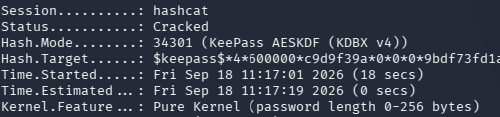
Finally, the success message